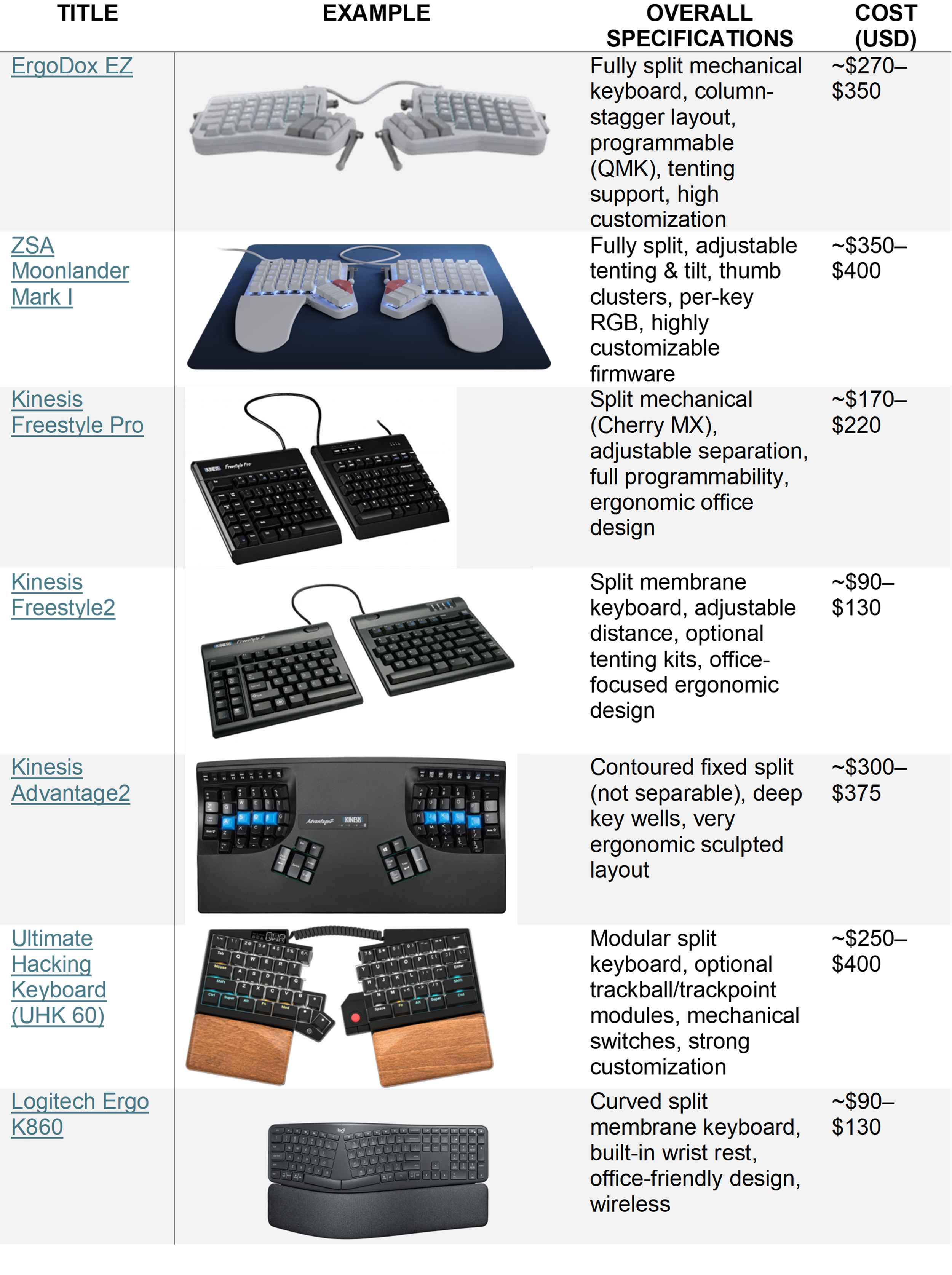
Mechanical vs. Standard Split Keyboards: Which Is Right for You?

When discussing ergonomic keyboards, one question comes up frequently: Should you choose a standard split keyboard or a mechanical split keyboard?
The answer depends on the user's work demands, preferences, and budget. While both options can help to improve posture and comfort, there are important differences between them.
Who Benefits Most from a Split Keyboard?
Although split keyboards can provide significant ergonomic benefits, they are not the ideal solution for every employee. Keyboard recommendations should be based on the individual's work demands, symptoms, body dimensions, and workstation setup.
Employees Who May Benefit from a Split Keyboard
Experience wrist, forearm, elbow, shoulder, or neck discomfort during computer work
Demonstrate excessive ulnar deviation, shoulder abduction & internal rotation while typing & have difficulty maintaining neutral upper body postures
Work with elbows positioned away from the body due to keyboard width
Spend several hours per day typing
Perform keyboard-intensive work such as programming, writing, data entry, or administrative tasks
Employees Who May Not Benefit from a Split Keyboard
Employees who do not demonstrate ergonomic risk factors while typing & are symptom free during typing
Have workstation issues that could be addressed through simpler modifications first (chair, monitor, keyboard placement, etc.)
Perform minimal keyboarding throughout the day or use only a mouse/touchscreen/voice-recognition
Find split keyboards uncomfortable or are less productive using them due to difficulty adapting
Are generally narrow-shouldered, or who have issues related to over-reaching for the mouse
Important: A split keyboard is not inherently better than a traditional keyboard for every employee. The most effective ergonomic solution is one that matches the individual's symptoms, work demands, workstation setup, and personal preferences.
Which is Best? Standard Keys vs. Mechanical Keys
The primary distinction between a standard split keyboard and a mechanical split keyboard lies in how the keys are activated.
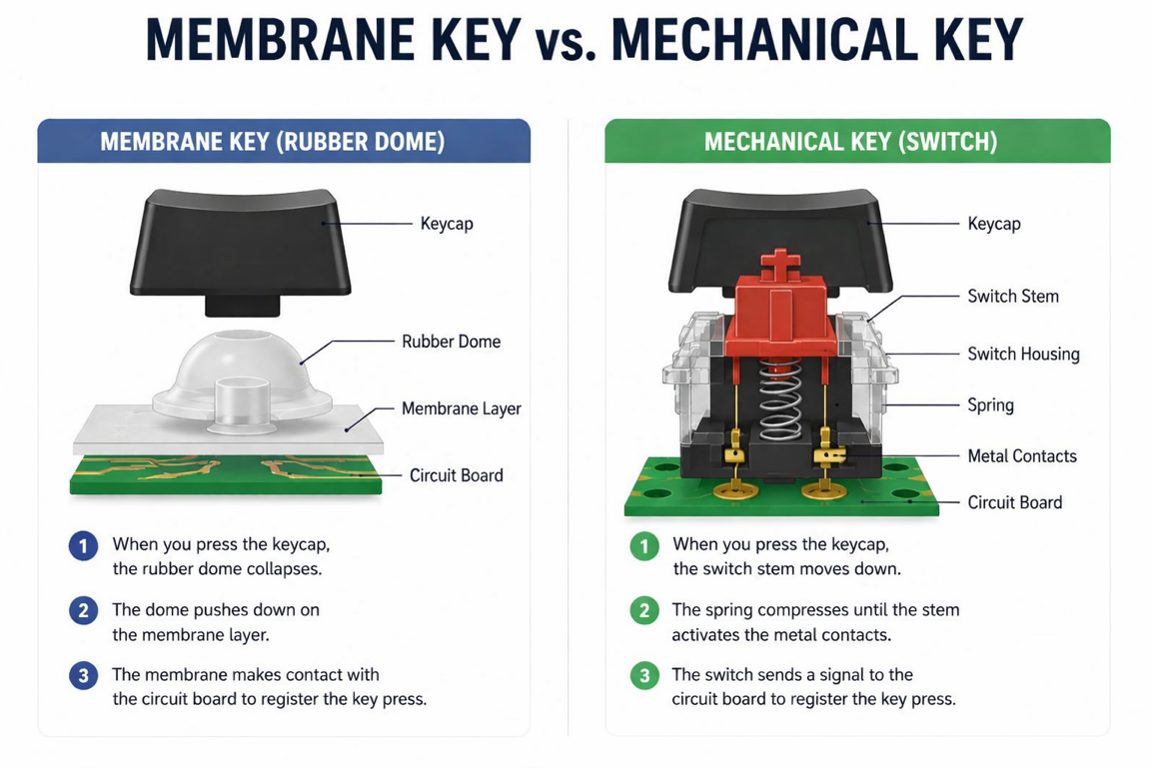
Standard split keyboards use a rubber dome or membrane beneath the keys. When a key is pressed, the membrane contacts a circuit and sends a signal to the computer.
Mechanical keyboards use individual spring-loaded switches beneath each key. Each switch operates independently, creating a more precise typing experience and providing tactile feedback when a key is activated.
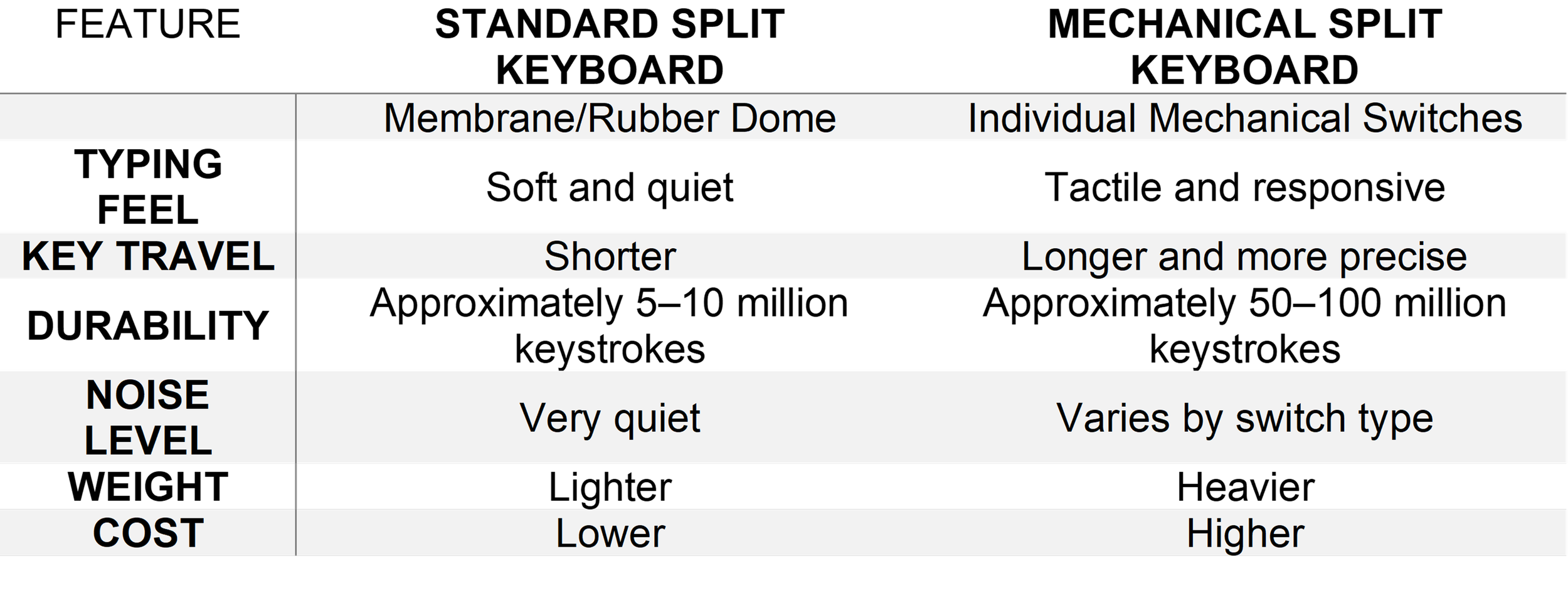
As a result, mechanical keyboards typically feel more responsive, offer greater durability, and allow for a wider range of customization options.
Key Differences at a Glance
The Ergonomic Benefits Are the Same
A common misconception is that mechanical keyboards are inherently more ergonomic. In reality, the primary ergonomic benefits come from the split keyboard design, not the switch type.
Both membrane and mechanical split keyboards can help:
Reduce shoulder internal rotation and prevent rounded slouching
Decrease shoulder abduction and keeps arms closer to body
Minimize ulnar deviation at the wrists and keeps the wrist more straight
Promote more neutral wrist positioning

These postural improvements can reduce musculoskeletal strain during prolonged computer work.
When a Standard Split Keyboard Makes Sense
For many office employees, a standard split keyboard is often the most practical choice.
Users who may benefit include:
Administrative staff
Customer service representatives
General office workers
Employees transitioning from a traditional keyboard
Standard split keyboards are lightweight, easy to learn, quiet in shared office environments, and typically more affordable than mechanical alternatives.
For employees experiencing shoulder, neck, elbow, or wrist discomfort, a standard split keyboard often provides all of the ergonomic benefits needed without the added cost of mechanical switches.
When a Mechanical Split Keyboard May Be Worth It
Mechanical split keyboards are often preferred by individuals who spend a significant portion of their workday typing, such as software engineers, programmers, or data entry specialists.
These users frequently appreciate the consistent tactile feedback, responsiveness, and durability offered by mechanical switches.
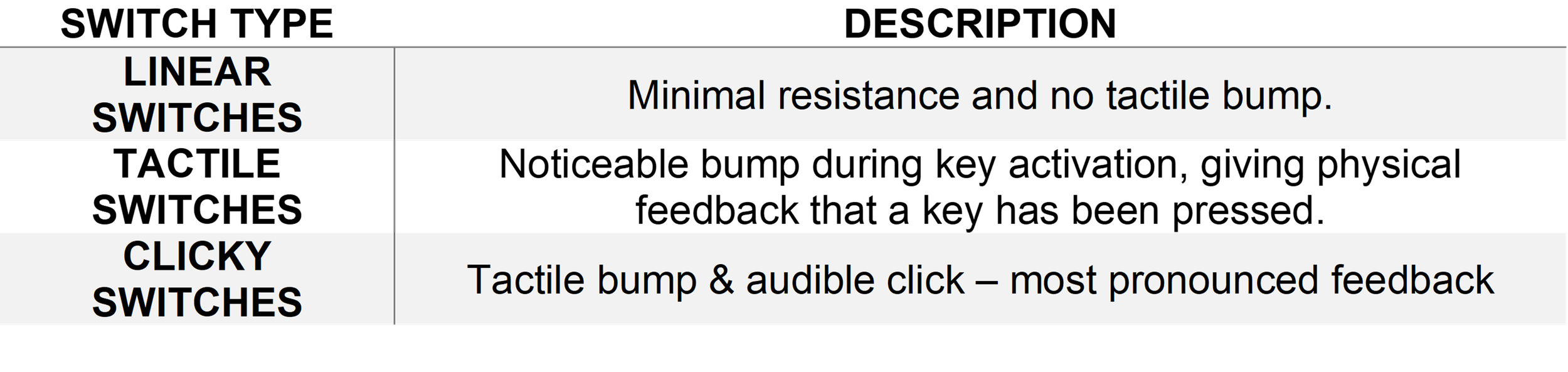
Mechanical keyboards also allow users to select different switch types based on personal preference, allowing for programmable keys, macros, and personalized key remapping.
Recommendations for Ergonomic Evaluations
When conducting an ergonomic assessment, keyboard selection should typically follow this order:
Choosing a keyboard design. (split, reduced reach, standard)
Position the keyboard at appropriate elbow height.
Use a compact layout when possible, to keep the mouse closer to the body.
Consider mechanical switches only if typing volume, user preference, or job demands justify the additional cost.